Install
Bring your own disc
The edition ships no game data and no crack. You supply your own copy of THUG2; the installer builds a playable, modded edition from it, entirely on your machine.
Choose your device
One installer, tuned per platform. It detects your system and does the rest, and never downloads game data; you bring your own copy of THUG2. No account, no launcher, no telemetry.
Steam Deck
No terminal · fully turnkeybash <(curl -fsSL https://raw.githubusercontent.com/violetvandal/revert/main/install.sh)- Easiest path: download the installer, mark it executable (right-click, Properties, Permissions), and double-click it. A graphical wizard does everything, with no terminal at any point.
- It creates your Deck password if you don't have one yet, installs Wine and the controller, fetches your game, and builds the edition, keeping the Deck awake the whole time. When it finishes it points you back to Gaming Mode.
- You supply your own THUG2 files (a folder, an ISO, or a download link you host). Nothing licensed is bundled or fetched for you.
Linux desktop
Download or one commandbash <(curl -fsSL https://raw.githubusercontent.com/violetvandal/revert/main/install.sh)- Download the installer and double-click it for a graphical, no-terminal setup, or run the one-command install in any terminal.
- It detects your system, sets up Wine and the controller, and builds the edition. Built and tested on Fedora and on SteamOS; it should run on most modern distros, though on non-Fedora systems you may need to install a couple of prerequisites yourself (doctor tells you which).
- You always supply your own copy of THUG2. No game data is downloaded.
Mac
Apple Silicon + Intelbash <(curl -fsSL https://raw.githubusercontent.com/violetvandal/revert/main/install.sh)- Run the one-command install in Terminal, or download the installer for your Mac (Apple Silicon or Intel) for the graphical wizard. Both do the same thing.
- No Homebrew and no admin password. It downloads a checksum-verified Wine into its own folder and installs nothing system-wide. macOS may ask you to install Apple's Command Line Tools first, which is a normal system dialog.
- THUG2 is a Direct3D 9 game and Macs have no geometry shaders, so it ships a build of DXVK patched to work around that. The game is GPU-accelerated, not a software-rendered slideshow.
- It becomes a real app: launch “THUG2 Violet Vandal Edition” from Spotlight like anything else. For a controller, pair an Xbox pad in XInput mode.
Windows
Native · no Wine- THUG2 runs natively on Windows, so there's no Wine and no emulation. Download the zip, extract it anywhere you like, and double-click revert-gui.exe.
- A one-button wizard installs the prerequisites, prepares your own game files, and builds the modded edition, then launches it. Xbox-style controllers work out of the box.
- You supply your own copy of THUG2 (a folder, or a link you paste). Nothing licensed is bundled or fetched.
The installer is a small app: after downloading, mark it executable (right-click, then Properties → Permissions) and double-click it, then follow the wizard. Prefer a terminal? Run the command with bash <(curl …), not curl … | bash, so the password prompt can read your keyboard.
Or, step by step (any Linux or Mac)
git clone --recursive https://github.com/violetvandal/revert.git
cd revert
./revert setup                                    # wine + controller (once)
./revert acquire-game-data --folder /path/to/THUG2   # or: --iso <cd1…> / --url <link>
./revert build                                    # build the edition
./revert run qol                                  # play  (vanilla | qol | online)
./revert status shows what’s done and what’s left at any point; ./revert update keeps you on the latest release. Prefer clicking? The built-in graphical installer runs the same steps in your browser.
The graphical installer
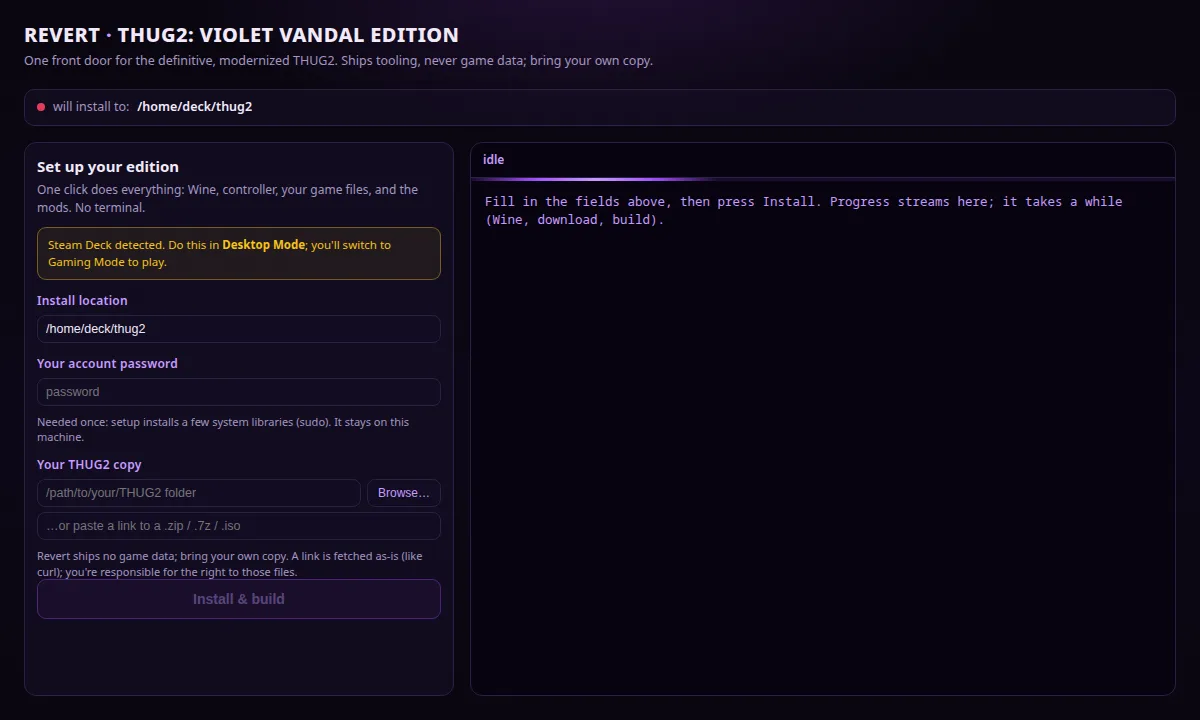
Double-click the download and a small window opens in your browser. It’s a local app; nothing leaves your machine. The first-run wizard asks for three things: where to install, your account password (it creates one if your Steam Deck doesn’t have a password yet, and uses it for the single setup step that needs admin rights, so there’s no terminal), and your own THUG2 files (a folder, or a link you paste). Press Install & build and it does the rest, streaming progress as it installs Wine, fetches your game, and builds the edition. On a Steam Deck it keeps the screen awake, then points you back to Gaming Mode when it’s done.
After that first run, the same app is your everyday cockpit: launch revert gui (or the “THUG2: Violet Vandal Edition” entry it adds to your app menu) to rebuild, switch lanes, or update, each step with a live console.
On a Mac
Both Apple Silicon (M1 and later) and Intel Macs are supported. THUG2 is a 32-bit Direct3D 9 game from 2004, and Metal has no geometry shaders, which is the wall that normally stops it dead on a Mac. The edition gets past it with a build of DXVK we patched for exactly that, so the game runs GPU-accelerated rather than as a software-rendered slideshow. It has been tested end to end on an M1 and on a 2018 Intel MacBook Pro.
The install needs no Homebrew and no admin password. It downloads a checksum-verified Wine into its own folder and installs nothing system-wide. macOS may ask you to install Apple’s Command Line Tools first; that is a normal system dialog, and the installer waits for it. When it finishes, launch “THUG2 Violet Vandal Edition” from Spotlight like any other app, or run revert run qol.
For a controller, pair an Xbox pad in XInput mode. macOS only exposes Microsoft-vendor pads to Wine, so other brands will pair with macOS happily but stay invisible to the game.
“Apple cannot verify this app”
Expect this if you download the installer, because it isn’t code-signed, so macOS quarantines it. It’s a warning about who we are, not about what the program does. Right-click the file, choose Open, then confirm. The one-command install above skips this entirely, since only downloads made by a browser get quarantined. The whole edition is open source, so you can read it or build it yourself.
On Windows
THUG2 runs natively on Windows, so the Windows build skips Wine entirely. Download revert-windows-amd64.zip, extract it anywhere you like, and double-click revert-gui.exe. A first-run wizard asks for one thing, your own THUG2 files (a folder, or a link you paste), then installs the prerequisites, builds the edition, and launches it. Plug in an Xbox-style pad and the trick combos are mapped for you. The same window is your everyday cockpit afterwards, and it updates itself in place.
“Windows protected your PC”
Expect this on first run. The download isn’t code-signed, so Windows shows an unknown-publisher notice, a warning about who we are, not about what the program does. Click More info, then Run anyway. Every release publishes a checksum so you can verify the file yourself, the built-in updater checks it automatically, and the whole edition is open source, so you can read it or build it yourself.
Then pick your lane
run vanillaVanilla
The faithful game: widescreen, correct controls, HQ Xbox audio & video. Nothing gameplay-altering.
run qolQOL-Modded
Every quality-of-life mod, stream-safe by default. Skip goals, kill traffic, keep the soundtrack, and more.
run onlineOnline
A THUG Pro lane for online play, complementary to the story/career/classic modes the edition preserves.
Streaming safely
THUG2’s licensed soundtrack is a DMCA risk on Twitch. The edition’s Streaming Mode and Violet Vandal Radio lane mute only the licensed jukebox while keeping the game’s bespoke ambient music, so you can stream the whole build worry-free.
The whole edition is open source (MIT). revert on GitHub · Releases · All tools →